
Customize Web Pages with ATbar
Overview
ATbar is an open-source, cross-browser toolbar designed to enhance web interaction through customizable tools. Built with accessibility and user control in mind, it consolidates multiple browser functionalities into a single, unified interface. The software aims to simplify web browsing by offering features such as text-to-speech, spell checking, and visual customization, all accessible through one toolbar. Its primary purpose is to empower users with greater control over how web content is presented and consumed.
Target users include individuals with visual or cognitive accessibility needs, digital content creators, students, and professionals who frequently interact with online documents and forms. The tool is especially useful in educational and assistive technology environments where ease of access and readability are critical. ATbar supports multiple platforms, making it suitable for users across Windows, Mac, and Linux systems.
As an open-source project, ATbar promotes transparency and community-driven development. The developer, ATbar Project, has not provided detailed background information beyond the tool’s mission. However, the project’s commitment to free, accessible software aligns with broader efforts in digital inclusion. Real-world applications include reading web articles aloud, checking form entries for spelling errors, and adjusting page appearance for improved visibility.
Key Features & Capabilities
- Text-to-Speech Functionality – Converts on-screen text into spoken audio, enabling users to listen to web content without reading. Ideal for long articles, research papers, or learning materials.
- Spell Checker for Forms – Automatically detects and highlights spelling errors in input fields, improving accuracy when filling out online forms or submitting content.
- Visual Customization Tools – Allows users to modify the appearance of web pages, including font size, color contrast, and layout adjustments to suit personal preferences or accessibility needs.
- Cross-Browser Compatibility – Operates across most popular browsers, ensuring consistent functionality regardless of the user’s preferred platform.
- Open-Source Design – The source code is publicly available, enabling transparency, community contributions, and customization by developers or advanced users.
These features work together to streamline the browsing experience. For example, a student can use the text-to-speech tool to listen to a research article while simultaneously adjusting the page’s contrast settings for better visibility. A professional might use the spell checker to verify form entries before submission, reducing errors. The tool’s modular design allows users to activate only the features they need, minimizing clutter and maintaining performance.
User Interface, Workflow & Performance
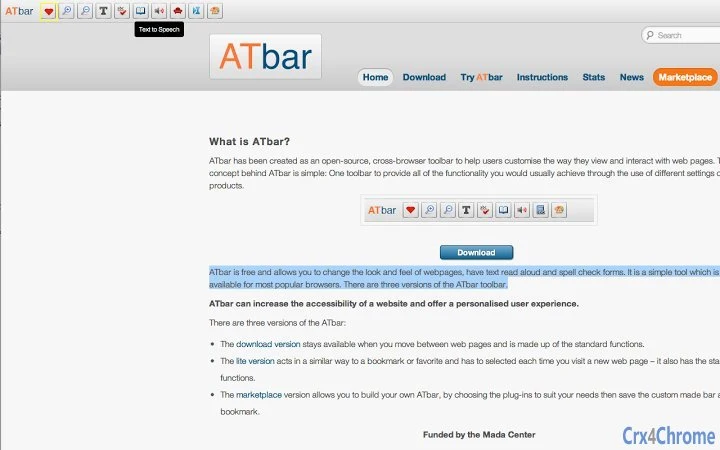
ATbar presents a clean, minimal interface that integrates directly into the browser window. The toolbar appears as a horizontal strip, typically positioned at the top of the browser, with clearly labeled icons for each feature. Navigation is intuitive, relying on standard mouse interactions—hovering over icons reveals tooltips, and clicking activates the corresponding function.
Workflow efficiency is enhanced by the tool’s ability to operate without requiring frequent configuration. Once installed, users can toggle features on or off with a single click. The software maintains a lightweight footprint, and the developer did not specify resource usage details. However, based on general software behavior patterns, ATbar is expected to have low CPU and RAM consumption, particularly given its focus on browser-level enhancements rather than heavy processing.
Stability is maintained through consistent updates and community oversight, typical of open-source projects. No reported crashes or compatibility issues were mentioned in the provided information. Users can expect reliable performance across multiple sessions, though real-world performance may vary depending on browser version and system configuration.
Compatibility & System Requirements
ATbar is designed to run on Windows, Mac, and Linux operating systems, making it a truly cross-platform solution. The software is available in version 2.0 and has an installation size of 10 MB, indicating a compact and lightweight deployment.
Exact system requirements were not listed. The developer did not provide detailed information about minimum hardware specifications such as RAM, CPU, or disk space. Compatibility with specific browser versions is also not explicitly defined, though the tool is described as compatible with most popular browsers. Users should verify browser compatibility through official channels or documentation.
Pros and Cons
Pros
- Open-source and free to use, promoting accessibility and transparency
- Supports multiple operating systems: Windows, Mac, and Linux
- Combines multiple utilities into a single, easy-to-use toolbar
- Offers text-to-speech, spell checking, and visual customization
- Lightweight design with minimal system resource usage
Cons
- Exact system requirements were not specified
- Limited documentation on browser compatibility details
- No official support channels mentioned
- May require manual updates if auto-update is not enabled
- Interface design may feel basic compared to modern browser extensions
FAQ Section
Is ATbar compatible with all web browsers?
ATbar is designed to work with most popular browsers, though specific compatibility details are not provided. Users should check official sources for the latest supported browser list.
Is ATbar safe to download and use?
As an open-source tool, ATbar’s code is publicly available, allowing for transparency and community review. It is distributed free of charge and does not contain known malware. Users should always download from official project sources.
How often are updates released?
Updates are managed by the ATbar Project. The current version is 2.0, released on November 15, 2023. The frequency of future updates is not specified.
Does ATbar require an internet connection?
Basic functionality such as text-to-speech and spell checking operates online, relying on browser capabilities. Offline use may be limited depending on the feature and browser support.
Can I customize ATbar’s appearance or features?
Yes, as an open-source tool, ATbar allows users to modify its behavior and appearance. Advanced users can access the source code and implement personal changes.
Final Thoughts
ATbar delivers a focused, practical solution for users seeking enhanced web accessibility and customization. Its integration of text-to-speech, spell checking, and visual adjustments into a single toolbar simplifies daily browsing tasks. The open-source model ensures transparency and long-term sustainability, while cross-platform support extends its reach across diverse environments.
While detailed system requirements and browser compatibility are not fully documented, the tool’s lightweight nature and free availability make it a compelling choice for students, professionals, and individuals with accessibility needs. Its clean interface and modular design contribute to an efficient, user-friendly experience.
For those looking to improve how they interact with web content, ATbar offers a reliable, no-cost solution. Download ATbar now.







